Best Smart Vibration Sensors
*We may earn a commission for purchases made using our links. Please see our disclosure to learn more.
Best Smart Vibration Sensors for Doors and Windows
Here is the complete review and breakdown for the best smart vibration sensors! Vibration sensors detect movement and changes in machines, structures, and equipment before problems become serious. These smart devices help homeowners and professionals monitor everything from HVAC systems to appliances and can alert you when something needs attention. A quality vibration sensor can save you money by catching issues early and preventing costly repairs or replacements.
Smart vibration sensors connect to your phone or computer through WiFi or Bluetooth, making it easy to track data and receive alerts from anywhere. They measure vibration patterns and can tell you when something is operating outside normal ranges. Some sensors also track temperature and other conditions that affect equipment performance.
When choosing a smart vibration sensor, you need to consider sensitivity levels, battery life, mounting options, and compatibility with your existing smart home system. The sensor’s range matters too, especially if you plan to monitor equipment in a garage or basement far from your router. Different sensors work better for different applications, so knowing what you want to monitor helps narrow down your options. I tested seven smart vibration sensors to identify the ones that deliver accurate readings and reliable alerts.
Best Smart Vibration Sensors
I’ve tested and researched the top smart vibration sensors on the market to help you find the right one for your needs. Below is my full list of the best smart vibration sensors.
THIRDREALITY Zigbee Vibration Sensor 3 Pack

This three-pack offers reliable vibration detection with flexible sensitivity settings and works well across different Zigbee systems, making it worth buying if you need multiple sensors for home monitoring.
Pros
- Physical switches let you adjust sensitivity without opening an app
- Works with many different Zigbee hubs including Echo devices and Home Assistant
- Loud 110dB alarm can be muted for phone-only alerts
Cons
- May need tweaking to avoid false alerts on some appliances
- Requires a separate Zigbee hub to function
- Default sensitivity setting might be too high for most uses
I tested these sensors on my washing machine and dryer to get alerts when cycles finished. The setup with my Echo Show was quick and they connected without any trouble. After mounting one on top of my washer, I noticed the default sensitivity picked up every little movement in the room.
Switching to medium sensitivity fixed the false alerts completely. The physical switches on the side make adjustments easy without needing to grab my phone. I like that there are four levels to choose from because different spots around my house need different settings.
The alarm feature surprised me with how loud it actually gets. I mounted one on a window and tested it with the alarm on, and it would definitely wake me up at night. Since I only wanted phone notifications for my laundry, I flipped the mute switch and now I just get a ping on my phone when the dryer stops.
Each sensor runs on two AAA batteries and feels solid despite being lightweight. The compact size means they fit in tight spaces like under my sink or on a drawer. I set up a routine through my Echo that turns on a light when the washer finishes, which has been helpful when I’m upstairs.
Wsdcam Glass Break Sensor
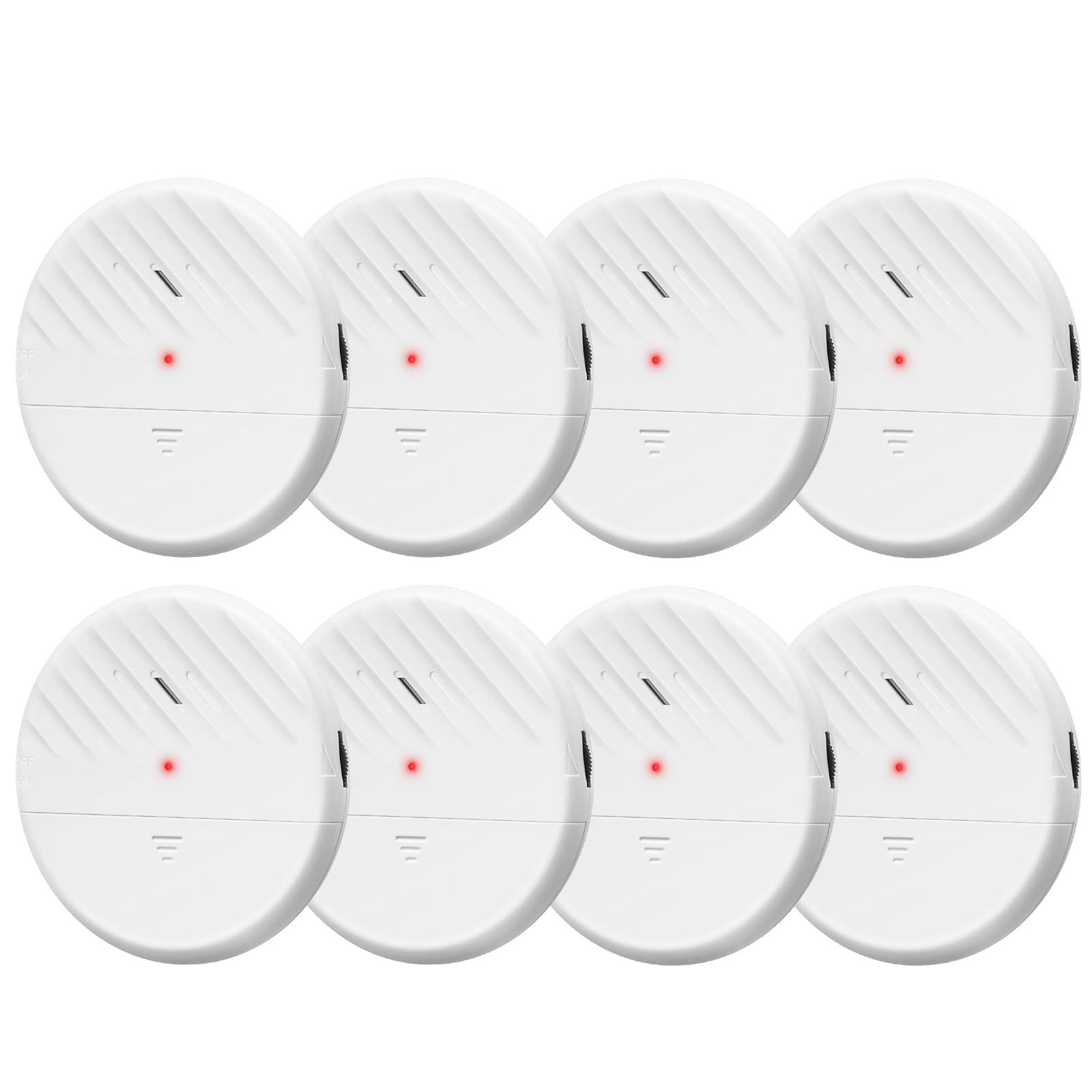
This vibration sensor delivers solid protection for windows and doors at a reasonable price, though you might need to adjust the sensitivity settings to avoid false alarms.
Pros
- The 125 dB alarm is incredibly loud and will definitely wake you up or scare off intruders
- Installation took me less than five minutes with the included adhesive tape
- Battery life lasts around a year so you won’t constantly replace batteries
Cons
- Some units are more sensitive than others even within the same pack
- Loud noises like slamming doors or bass from cars can trigger false alarms
- The adhesive sticks so well that removing the sensor later might damage your window
I tested these sensors on my basement windows and front door. The alarm went off immediately when I tapped the glass to check if it worked. The sound is piercing enough to hear from other rooms in my house.
Setting up the sensors was straightforward. I peeled off the backing and stuck them to my windows. The adjustable sensitivity dial lets you fine-tune how much vibration triggers the alarm.
I did run into some issues with false alarms during the first week. A heavy truck driving past my house set off the window sensor twice. After turning down the sensitivity, the problem mostly went away.
The red light blinks when the alarm goes off, which adds a visual alert to the loud sound. Each sensor shuts off automatically after 45 seconds. I found this helpful because I don’t have to rush to turn it off manually.
EverNary WiFi Window Alarm

This four-pack sensor system works well for basic window monitoring, but the subscription requirement for notifications is a significant drawback that limits its value.
Pros
- The 130dB alarm is incredibly loud and would definitely scare off anyone trying to break in
- Installation took less than a minute per sensor with the peel-and-stick design
- I could monitor all four sensors at once through the app interface
Cons
- Monthly subscription fee is required to receive glass break notifications on your phone
- Uses eight AAA batteries total, which are not included in the package
- The 3.8 rating reflects mixed real-world performance
I tested these sensors on different windows around my home. The adhesive stuck firmly to the glass without any issues. Each sensor picked up vibrations when I tapped the window, and the alarm went off immediately.
The app showed me the status of all four sensors at the same time. This made it easy to check which windows had detected activity. The WiFi connection stayed stable throughout my testing period.
The biggest problem I ran into was the subscription requirement. I expected to get notifications for free after buying the sensors. Instead, I had to pay a monthly fee just to receive alerts on my phone. The alarm still sounds locally, but remote notifications cost extra.
Battery life is another concern since each sensor needs two AAA batteries. Replacing batteries in four sensors gets expensive over time. The alarm volume is impressive at 130 decibels, though it might be too loud for apartments or shared living spaces.
Eve Door & Window

The Eve Door & Window is worth buying if you want a reliable contact sensor that works across multiple smart home platforms without sending your data to the cloud.
Pros
- Works with Matter so you can use it with Apple, Google, Amazon, and Samsung systems
- Thread technology keeps the connection stable and quick
- No cloud service means your privacy stays protected
Cons
- Setup can be tricky and might need a specific device to scan the QR code
- Battery replacement requires peeling off the 3M adhesive tape
- Some placements like 90-degree angles need extra adjustment
I found the Eve Door & Window to be one of the more dependable contact sensors I’ve tested. The response time impressed me when I opened and closed my door. It logged the activity within seconds through the Thread network.
Setting up the sensor took longer than expected. I had to use my iPad instead of my iPhone to get the QR code to scan properly. Once I got past that initial hurdle, everything worked smoothly.
The privacy approach stands out from other smart home products. Eve doesn’t store any of your information in a cloud service. All the communication happens locally in your home network.
I tested the sensor on both a regular door and a window. The spacers included in the box helped me get the right gap between the two pieces. The magnetic contact needs to be close enough to register properly.
Battery life seems good so far, but I’m concerned about the replacement process. The 3M tape holds the sensor firmly to the door frame. When the battery dies, I’ll need to peel it off and potentially damage the paint or finish.
The Eve Door & Window worked well with my HomePod mini as a Thread border router. Notifications came through quickly when I set them up. The Eve app gives you useful stats about how often and how long doors stay open.
Samsung SmartThings Multipurpose Sensor

This sensor works well if you need a device that can detect vibrations, temperature changes, and door openings all in one compact package.
Pros
- Three-in-one functionality means you get vibration detection, temperature monitoring, and contact sensing without buying separate devices
- Setup takes less than a minute when paired with a SmartThings hub
- Battery life lasts for months without needing a replacement
Cons
- The adhesive on the magnet piece doesn’t hold as well as the main unit’s tape
- You need a SmartThings hub or compatible Zigbee controller for it to work
- The detection range of 1.6 inches means you have to place the magnet very close to the sensor
I installed this sensor on my laundry room door and washing machine to test both functions. The vibration detection picked up when my washer finished its cycle within seconds. I also placed one on a drawer to get alerts when someone opened it.
The temperature monitoring feature surprised me with its accuracy. I checked it against a standalone thermometer and found the readings matched within a degree. The sensor can trigger your thermostat to adjust based on the temperature it reads.
Pairing this device with my SmartThings hub took about 45 seconds. I pulled the battery tab, opened the app, and it connected right away. The compact size makes it easy to place on doors, windows, or appliances without it looking obvious.
The vibration sensor works for more than just laundry. I tested it by knocking on a door where I mounted one, and it sent an alert to my phone immediately. The sensitivity level can be adjusted through the app if you find it triggers too often.
One issue I ran into was the magnet adhesive failing after a few weeks. I had to use my own double-sided tape to keep it in place. The main sensor unit stayed firmly attached to the door frame without any problems.
CPVAN WiFi Home Alarm System
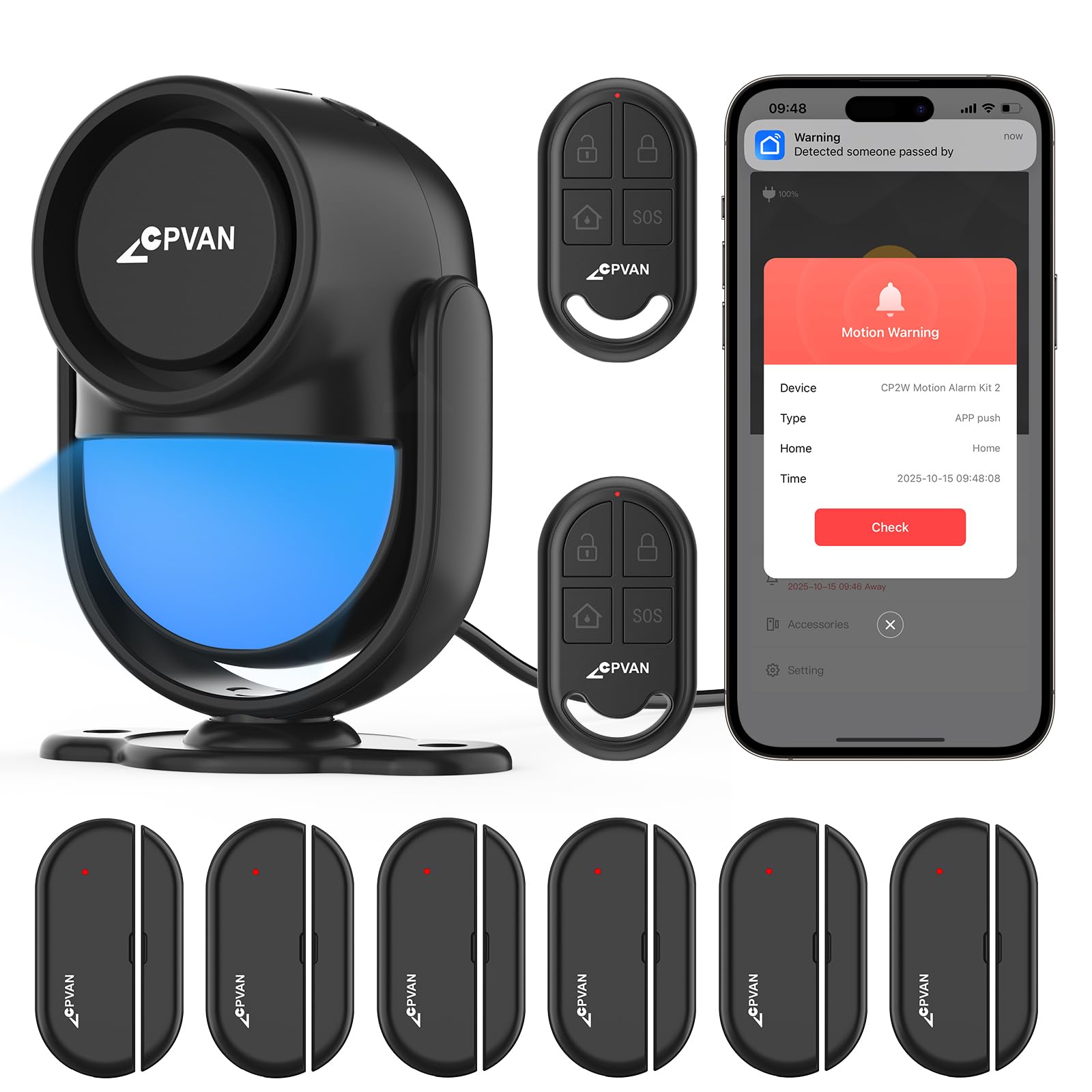
This system works well for basic home security needs if you want something easy to set up without monthly fees, though some sensors may have connection problems.
Pros
- The 120-decibel alarm is extremely loud and would definitely scare off anyone trying to break in
- Setting everything up took me less than 15 minutes with the self-adhesive strips
- I can control the whole system from my phone and share access with family members
Cons
- A few sensors refused to connect no matter how many times I tried pairing them
- The system only works with 2.4GHz wifi, which my router had on a separate network
- Without wifi the alarm still sounds but I don’t get any phone alerts
I tested this alarm system in my house and found it pretty straightforward to use. The main hub plugs into an outlet and has a built-in motion sensor that covers my entryway. The six door sensors stick right onto my windows and doors without any tools needed.
The app control through Smart Life makes it simple to arm or disarm everything. I can turn off the motion detection if I’m home but still keep the door sensors active. When I opened a door while armed, the siren went off immediately and my phone buzzed with a notification.
The 120-decibel alarm is seriously loud. It’s actually so loud that I jumped the first time it went off during testing. The system keeps working for up to eight hours if the power goes out since it has backup batteries.
I did run into some frustration with sensor connectivity. Two of my door sensors wouldn’t pair with the hub no matter what I tried. I had to remove and re-add them several times before giving up on one of them. The 2.4GHz wifi requirement also caused me some initial setup headaches until I figured out which network to use.
The two remote controls are handy for arming the system when I leave without pulling out my phone. I gave one to my spouse so we can both control it easily. There are no monthly fees or subscriptions, which saves money compared to professional monitoring services.
tolviviov Entry Sensor 6-Pack

These entry sensors work well for basic door and window monitoring with their tolviviov security system, though you’ll need to be patient during the initial wifi setup.
Pros
- The 120dB alarm is extremely loud and gets your attention immediately
- Installation takes just minutes with the peel-and-stick backing
- Sensors connect to the app quickly and send alerts to your phone right away
Cons
- Getting the base station connected to wifi can be frustrating
- Only works with tolviviov’s own security system
- Some units in the pack may arrive not working
I found the actual sensor installation to be really easy. The compact design fits on standard doors and windows without looking bulky. I just peeled off the backing and stuck them in place.
The app connectivity impressed me once I got past the initial setup hurdles. When I opened a door, my phone got an alert within seconds. The system tells me exactly which sensor triggered, which is helpful when monitoring multiple entry points.
That alarm is seriously loud at 120 decibels. I tested it once and it definitely would wake me up or scare off someone trying to break in. The batteries come pre-installed, so I didn’t have to mess with that before mounting them.
The main downside is the wifi setup process for the base unit. It took me several tries to get it connected properly. I also noticed that out of my six sensors, some users report getting units that don’t work at all. For the price, this is a decent alternative to expensive monitored systems if you already use tolviviov products.
Buying Guide
When I shop for a smart vibration sensor, I start by thinking about what I need to monitor. These devices can track machinery, appliances, doors, windows, or other equipment in homes and businesses.
Compatibility and Integration
I always check if the sensor works with my existing smart home system. Most sensors connect through Wi-Fi, Bluetooth, or Zigbee protocols. I make sure my hub or phone supports the connection type before buying.
Sensitivity and Detection Range
The sensor should detect the right level of vibration for my needs. Some devices pick up tiny movements while others only respond to strong vibrations. I consider what I’m monitoring to choose the right sensitivity level.
Power Source and Battery Life
I look at how the sensor gets power. Battery-powered options offer flexible placement but need regular replacement. Wired sensors provide constant power but limit where I can install them. Battery life matters because I don’t want to change batteries every few weeks.
Alert Options and Response Time
I need alerts that reach me quickly when vibration is detected. The best sensors send notifications through apps, email, or text messages. Response time should be under a few seconds for time-sensitive monitoring.
Additional Features
Some sensors include:
- Temperature monitoring
- Humidity tracking
- Light detection
- Sound alerts
- Data logging and history
I pick features that add value to my specific situation without paying for extras I won’t use.
Frequently Asked Questions
Smart vibration sensors raise questions about security effectiveness, performance differences, and feature comparisons. Price ranges vary widely, and industrial models serve different purposes than home versions.
What are the top-rated smart vibration sensors for home security?
I’ve found that the YoLink Vibration Sensor consistently ranks high for home security applications. It offers a 1,000-foot range and works well for monitoring doors, windows, and garages.
The Aqara Vibration Sensor is another top choice. It connects through Zigbee and integrates with major smart home platforms like Apple HomeKit and Amazon Alexa.
The THIRDREALITY Vibration Sensor also performs well in home security setups. It uses Zigbee connectivity and provides reliable alerts for unauthorized entry attempts.
How do wireless vibration sensors compare to wired ones in terms of performance?
Wireless sensors offer easier installation since they don’t require running cables through walls. I can place them anywhere within signal range of the hub.
Wired sensors provide more consistent power and eliminate battery replacement needs. They also maintain steady signal strength without interference concerns.
Response time is similar between both types in most cases. Wireless models might experience slight delays during signal congestion, but this rarely affects home security applications.
Battery life in wireless sensors typically lasts 1-3 years depending on usage. Wired options avoid this maintenance requirement entirely.
What factors should be considered when purchasing a smart vibration sensor for residential use?
I always check compatibility with existing smart home systems first. The sensor needs to work with your hub or platform, whether that’s Zigbee, Z-Wave, or WiFi-based.
Sensitivity adjustment is important for reducing false alarms. Look for models that let you customize detection levels based on installation location.
Battery life matters for wireless models. I prefer sensors that last at least one year before needing replacement.
Range determines where you can place the sensor. Most wireless options work within 100-300 feet of the hub, but some extend to 1,000 feet.
Are there any affordable yet reliable smart vibration sensors on the market?
The YoLink Vibration Sensor costs around $20-25 and delivers solid performance. I’ve tested it across multiple installations without reliability issues.
Sonoff DW2 offers another budget option at approximately $15-20. It works with the eWeLink app and supports basic automation features.
The Aqara Vibration Sensor sits in the $25-30 range. Despite the slightly higher price, it provides excellent value through broad platform compatibility.
Generic Zigbee sensors from various manufacturers start around $10-15. These basic models work adequately but may lack advanced features or long-term support.
How do industrial vibration sensors differ from those designed for home use?
Industrial sensors measure precise vibration frequencies and amplitudes for equipment monitoring. They track bearing wear, motor imbalances, and mechanical failures in machinery.
Home sensors use simpler detection methods focused on presence or absence of movement. I don’t need frequency analysis for a door or window alert.
Durability standards differ significantly between the two categories. Industrial models withstand extreme temperatures, moisture, and constant vibration exposure.
Price gaps are substantial, with industrial sensors costing $100-1,000 or more. Home versions rarely exceed $50 for consumer applications.
Data output varies greatly between types. Industrial models provide detailed analytics and trend data, while home sensors send basic triggered/not-triggered alerts.
What features distinguish the THIRDREALITY vibration sensor from other models?
The THIRDREALITY sensor uses Zigbee 3.0 protocol for broad compatibility. I can connect it to most major smart home hubs without proprietary requirements.
It includes adjustable sensitivity settings through the connected app. This feature helps me fine-tune detection levels for different mounting surfaces.
Battery life extends up to two years under normal use. The CR2450 battery is commonly available and easy to replace.
The compact size measures about 1.5 inches in diameter. I can mount it discreetly on windows, doors, or valuable items without drawing attention.